 Java
InterfacesGUI
(Graphical User Interface)Java
DCE (Distributed Computing Environment) Developer GuideBack
to User Guide Java
InterfacesGUI
(Graphical User Interface)Java
DCE (Distributed Computing Environment) Developer GuideBack
to User Guide |
.Java
Interfaces Java Interfaces Java Interfaces1.The interface of 'Java class for action' is ci.CIAction.java, as follows: package ci; public interface CIAction { public void startAction(CrInstrument instrument,String actionCode,CIDataClass dc,String parameters[]); public void onExit(int type); } Code example: package ci_example; public class CIActionExample extends javax.swing.JFrame implements ci.CIAction { private javax.swing.JButton jButton1; private javax.swing.JTextField jTextField1; CrInstrument instrument; boolean firstTimeRun=true; public CIActionExample() { initComponents(); } private void initComponents() { jButton1 = new javax.swing.JButton(); jTextField1 = new javax.swing.JTextField(); setDefaultCloseOperation(javax.swing.WindowConstants.EXIT_ON_CLOSE); getContentPane().setLayout(null); jButton1.setFont(new java.awt.Font("Microsoft JhengHei UI", 0, 24)); jButton1.setText("Exit"); jButton1.addActionListener(new java.awt.event.ActionListener() { public void actionPerformed(java.awt.event.ActionEvent evt) { jButton1ActionPerformed(evt); } }); getContentPane().add(jButton1); jButton1.setBounds(140, 110, 90, 40); jTextField1.setFont(new java.awt.Font("Microsoft JhengHei UI", 0, 24)); jTextField1.setText("Hello World!"); getContentPane().add(jTextField1); jTextField1.setBounds(30, 30, 350, 40); pack(); } private void jButton1ActionPerformed(java.awt.event.ActionEvent evt) { System.exit(0); } public void startAction(CrInstrument instrument,String actionCode,CIDataClass dataClass,String para[]){ if(firstTimeRun){ this.instrument=instrument; instrument.setVisible(false); firstTimeRun=false; } if(para.length>0 && para[0].equals("1")){ //do something } } public void onExit(int code){ //do something; } } Usage example: 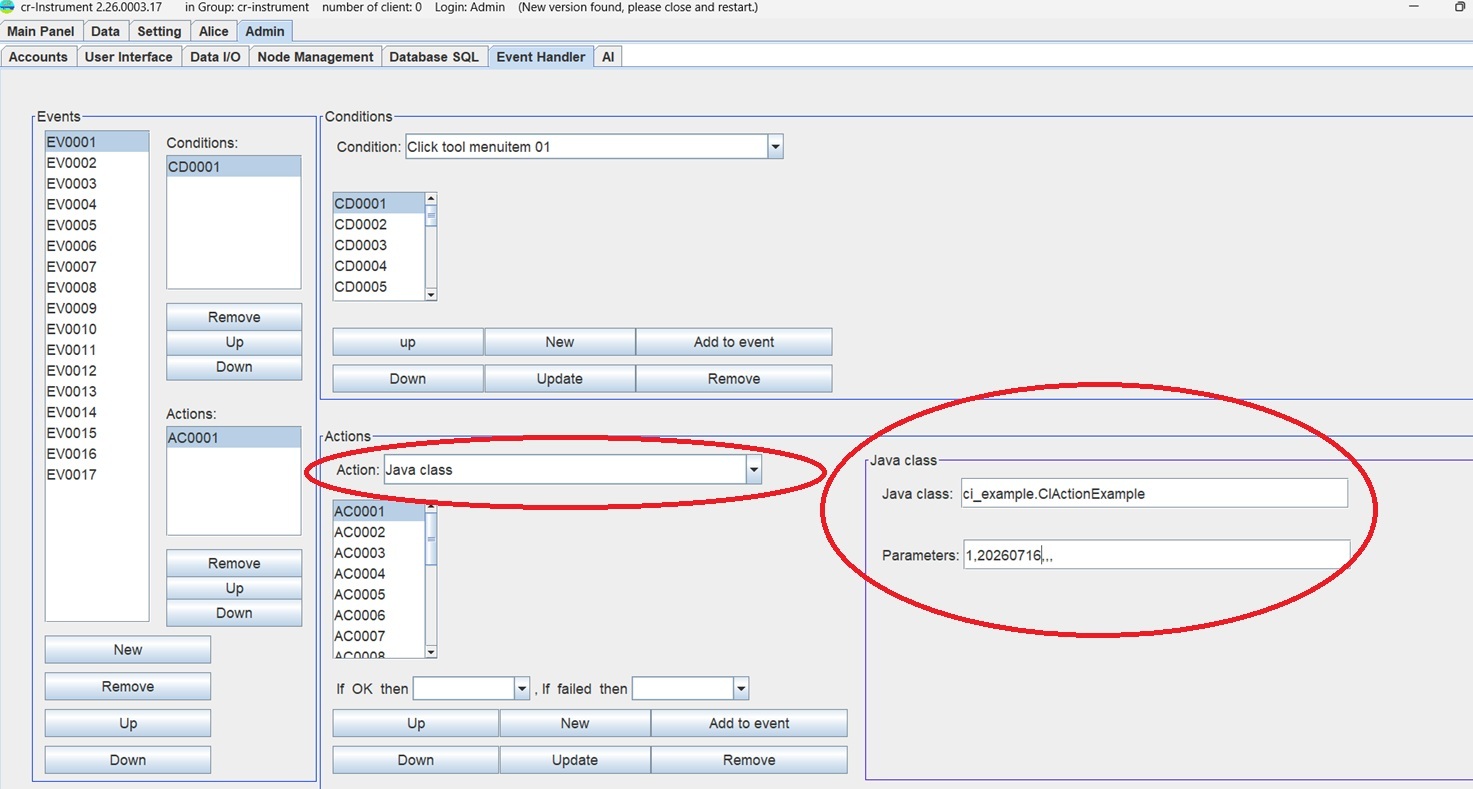 This will call the startAction(CrInstrument instrument, String actionCode, CIDataClassdc, String para[]) method in CIAction.java. 2.The interface of 'Java class for checking data' is ci.CIChkDataClass.java, as follows: package ci; public interface CIChkDataClass { //The input data format is in hex mode, ex: 'E5 F6 45 65'. public boolean chkData(String data); } Code example: pakage ci_example; public class CheckData implements ci.CIChkClass{ boolean result=true; public boolean chkData(String data){ if(data.length()>0) result=true; else result=false; } return result; } Usage example: 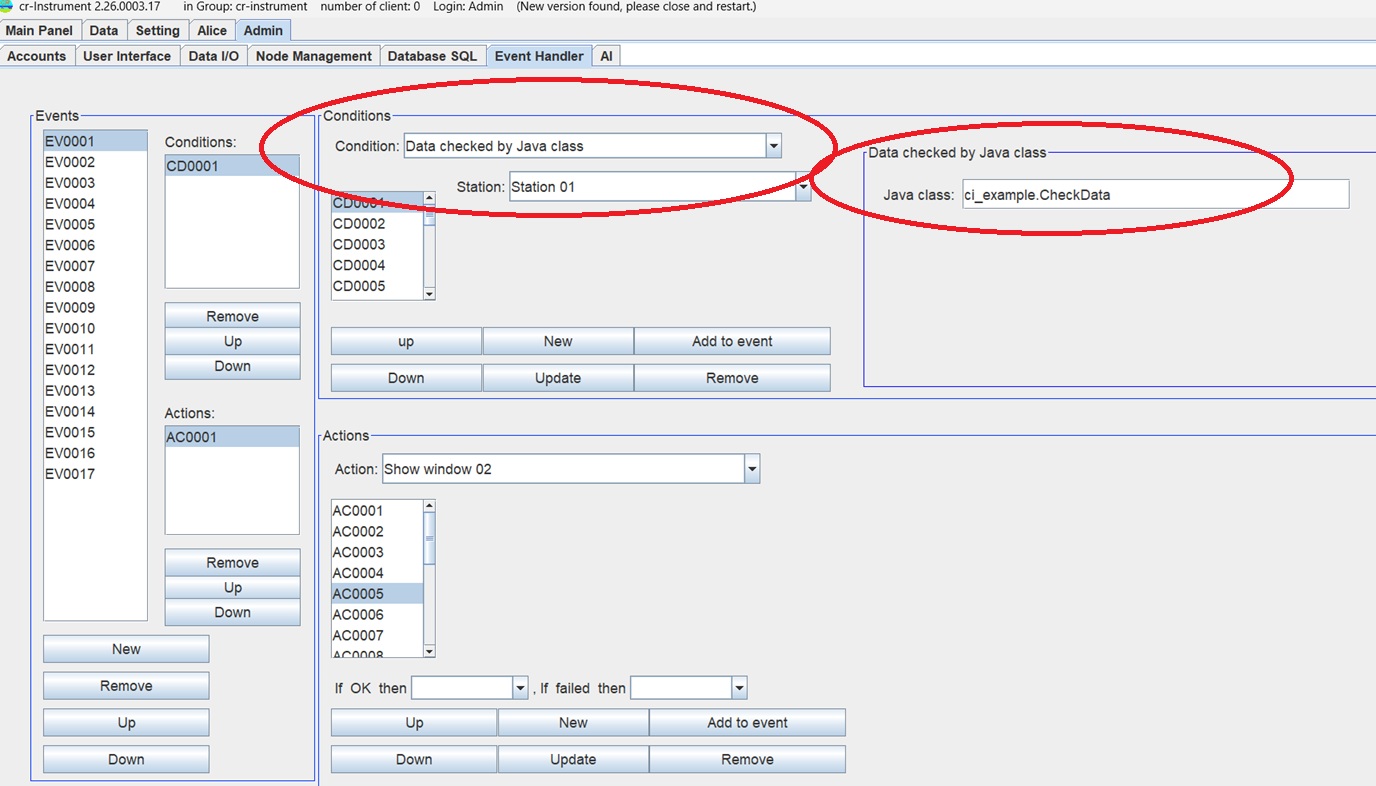 3.The interface of 'Java class for sending command' is ci.CIDataGenerator.java, as follows: package ci; public interface CIDataGenerator { public byte[] getData(); } Code example: /* * temperature: 20~23 => 20 + 0~10 * humidity: 60% ~ 70% =>60 + 0~10 * CO2 : 500 ~ 600 =>500 + 0~100 */ package ci_example; import java.text.SimpleDateFormat; import java.util.Date; import ci.CIDataGenerator; //output data ex: 2017/05/05 21:19:42,K234,23.0,68,564 public class CIDemoDeviceData implements CIDataGenerator { SimpleDateFormat format=new SimpleDateFormat("yyyy/MM/dd HH:mm:ss"); public byte[] getData(){ String date=format.format(new Date()),id="K234",coordinatorId="COOR01",dummyId="DUMMY"; double te1=20.0,te2=60.0,te3=500.0; int value=180; String temp1=""+(te1+Math.random()*5.0); String temp2=""+(te2+Math.random()*10.0); String temp3=""+(te3+Math.random()*100.0); int inx=temp1.indexOf("."); if(inx>-1) temp1=temp1.substring(0, inx+2); else temp1=temp1+".0"; inx=temp2.indexOf("."); if(inx>-1) temp2=temp2.substring(0,inx); inx=temp3.indexOf("."); if(inx>-1) temp3=temp3.substring(0, inx); String data=date+","+id+","+temp1+","+temp2+","+temp3+","+coordinatorId+",,"; return data.getBytes(); } } Usage example: 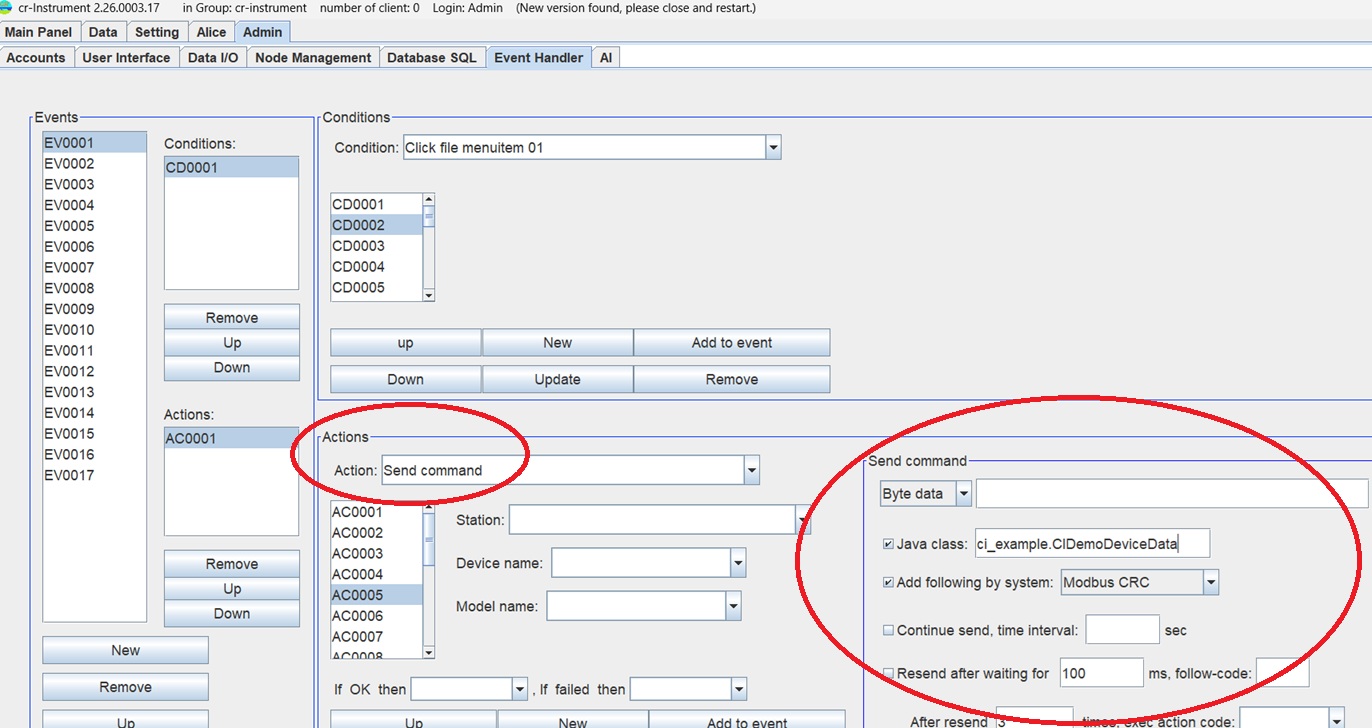 4.The interface of 'Java class for transforming data value' is ci.CITransferClass.java. package ci; public interface CITransferClass { public double getValue(double value); } Code example: package ci_example: public class DemoTransfer implements ci.CITransferClass { public double getValue(double value){ return value * 1000.0L; } } Usage example: 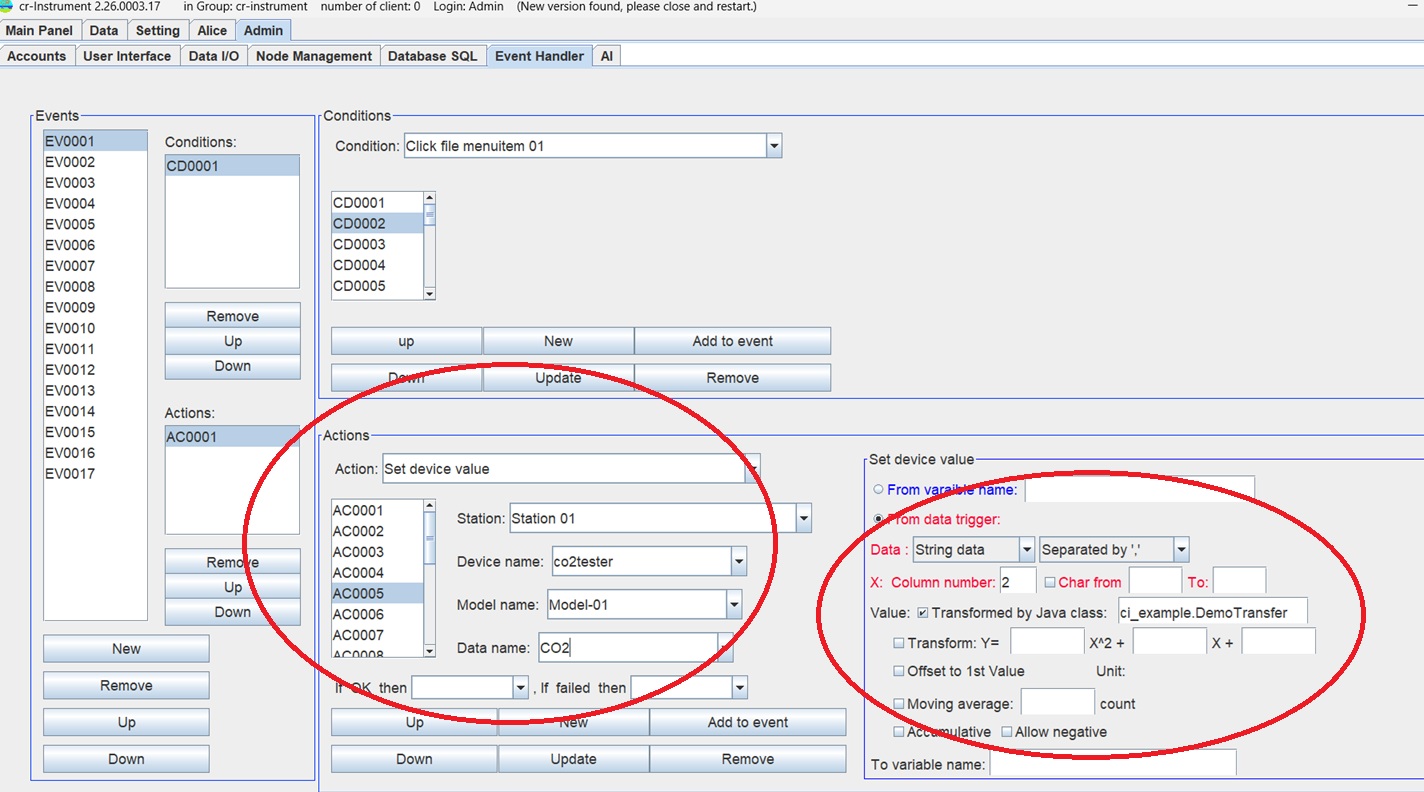 5.The interface of 'Java class for welcome panel' is y.ylib.WelcomePanel.java, as follows: package y.ylib; public interface WelcomePanel { public void setVisibleOff(); public void setVisibleOn(int arg0, int arg1, String[] arg2); public void setValue(int arg0); public void setEstimatedTime(int arg0); } Code example: package ci_example; import y.ylib.WelcomePanel; import javax.swing.*; public class WelcomeImage implements WelcomePanel { WelcomeFrameImage dialog01=new WelcomeFrameImage(""); public void setVisibleOff(){ dialog01.stop(); } //type:1=welcome,2=waiting public void setVisibleOn(int type, int estimateTime, String para[]){ dialog01.setPara(para); dialog01.begin(); } //to set time status by value, value=0~100 public void setValue(int value){ } public void setEstimatedTime(int timeInSec){ } class WelcomeFrameImage extends javax.swing.JFrame { int min=0,max=100,value=0,estimatedTime=0;//estimatedTime is in sec int type=0;//0=no welcome panel,1=default,2=image file,3=class long startTime=0; Image iconImage; PanelA panelA=new PanelA(); public WelcomeFrameImage(String title) { super(title); setUndecorated(true); initComponents(); this.getRootPane().setBackground(new Color(230,170,120,0)); this.setBackground(new Color(230,170,20,0)); this.getContentPane().setBackground(new Color(255,153,153,0));//pink//255,255,255 getContentPane().add(panelA, java.awt.BorderLayout.CENTER); pack(); } public void begin(){ panelA.repaint(); setVisible(true); try{ Thread.sleep(5L); }catch(InterruptedException e){ } } public void stop(){ this.setVisible(false); this.dispose(); } public void setPara(String para[]){ setTitle(para[0]); int screenWidth=Toolkit.getDefaultToolkit().getScreenSize().width;//parent.getWidth(); int screenHeight=Toolkit.getDefaultToolkit().getScreenSize().height-20;//parent.getHeight(); String imageFile=para[1]; int w2=0,h2=0; double w3=0.0,h3=0.0; if(para[2].indexOf(".")>-1){ w3=Double.parseDouble(para[2]); if(w3<1.0){ w3=w3*((double)screenWidth); h3=Double.parseDouble(para[3])*w3; w2=(int)w3; h2=(int)h3; } else { w2=(int)w3; h3=Double.parseDouble(para[3]); h2=(int)h3; } } else { w2=Integer.parseInt(para[2]); h2=Integer.parseInt(para[3]); } setSize(w2,h2); if(new File(imageFile).exists()) { BufferedImage img = null; try { img = ImageIO.read(new File(imageFile)); iconImage=(Image)img;//img.getScaledInstance(img.getWidth(), img.getHeight(), Image.SCALE_SMOOTH); } catch (IOException e) { e.printStackTrace(); } } else { if(getClass().getClassLoader().getResource("crtc_logo_t.gif")!=null) iconImage=new ImageIcon(getClass().getClassLoader().getResource("crtc_logo_t.gif")).getImage(); } if(iconImage!=null) { } else { System.out.println("iconImage is null"); } setLocation((screenWidth-w2)/2,(screenHeight-(h2))/2);//h2+20 } private void initComponents() { setDefaultCloseOperation(javax.swing.WindowConstants.EXIT_ON_CLOSE); pack(); } } class PanelA extends JPanel{ public PanelA(){ setBackground(new Color(230,170,20,0));//dark yellow//255,255,255 } @Override public void paintComponent(Graphics g){ super.paintComponents(g); Graphics2D g2= (Graphics2D)g; int w=WelcomeFrameImage.this.getContentPane().getWidth(); int h=WelcomeFrameImage.this.getContentPane().getHeight(); int imageH=h; int imageW=w; g2.drawImage(iconImage, 0, 0, imageW, imageH, rootPane); } } } } Usage example: 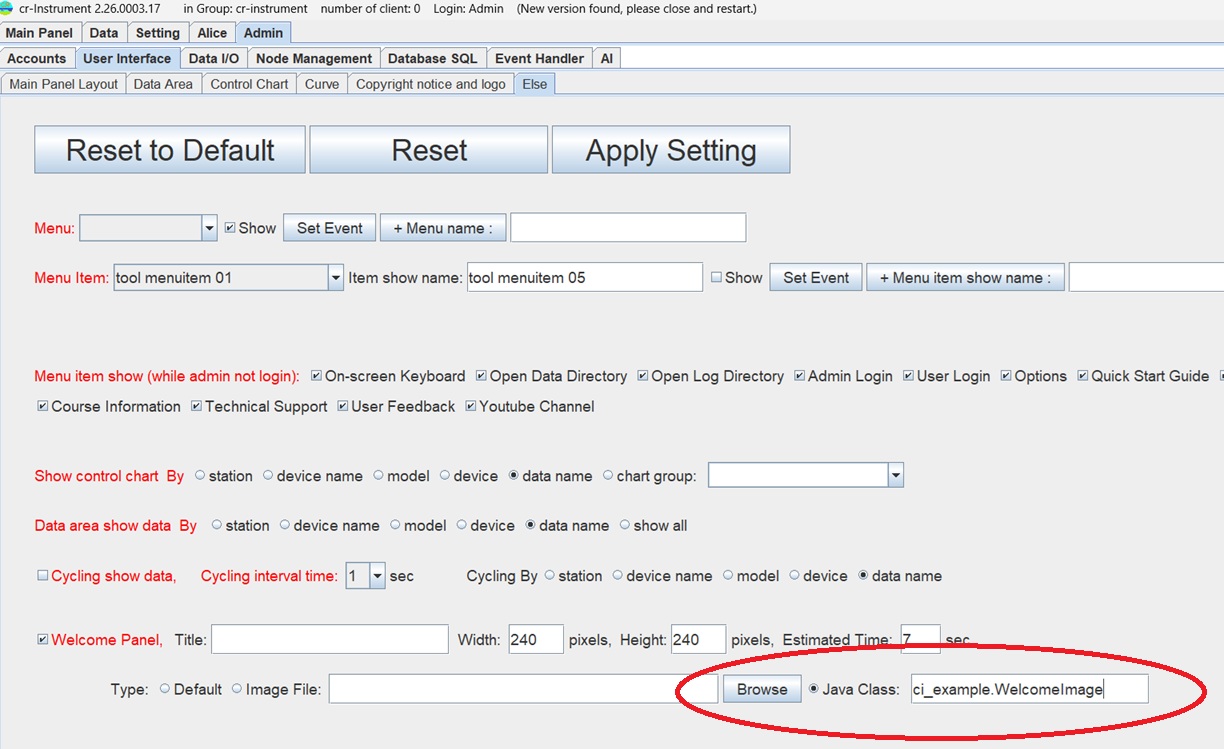 |
.GUI (Graphical User
Interface) cr-Instrument
uses swing api to design GUI. The framework of GUI is as following: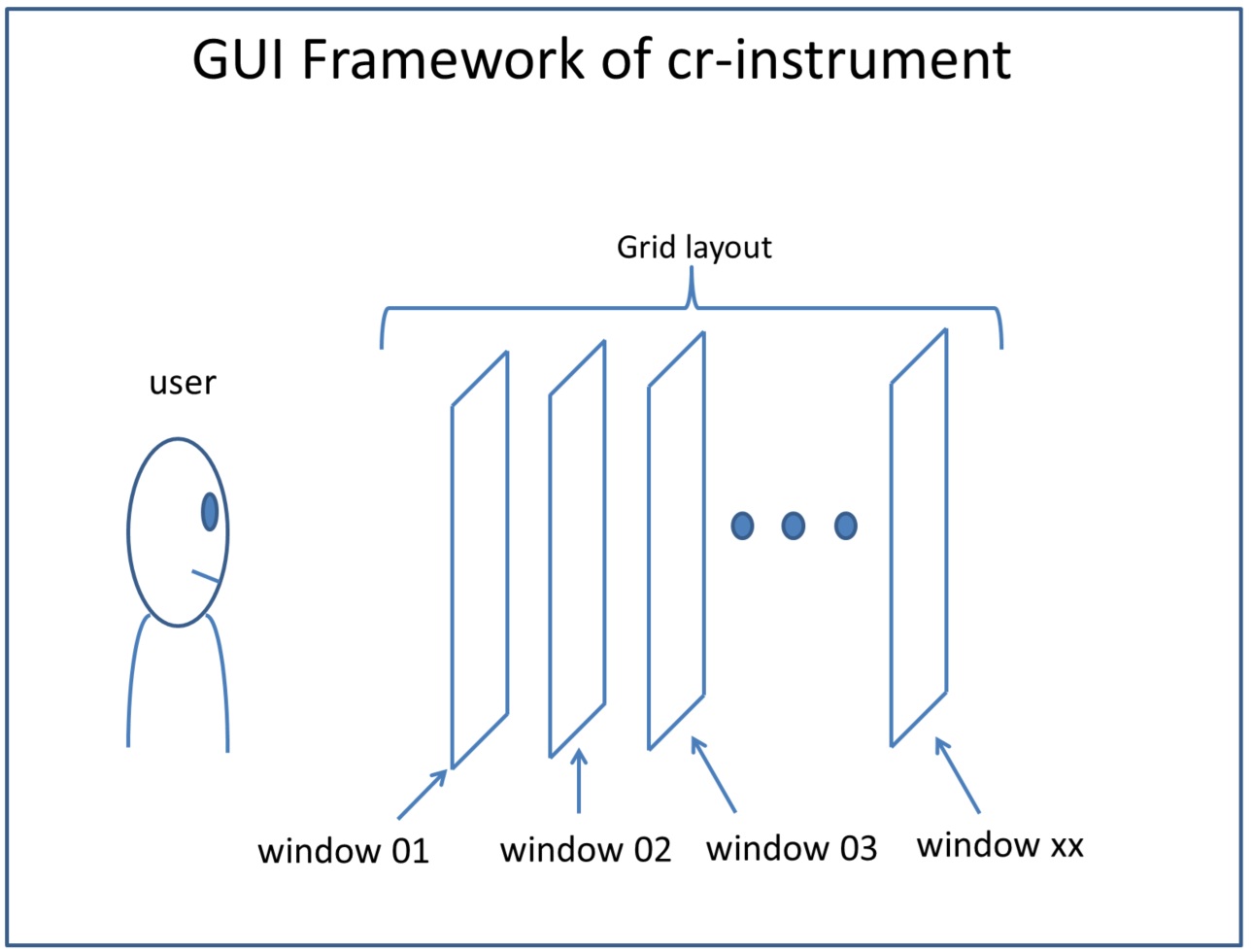 Each window impliments interface ci.CWindow.java, as following: package ci; import javax.swing.*; public interface CWindow { JButton button(int i); JCheckBox checkbox(int i); JComboBox combobox(int i); JLabel label(int i); JList list(int i); void setVisible(boolean v); JScrollPane listScrollpane(int i); JPanel panel(int i); JRadioButton radiobutton(int i); JTable table(int i); JScrollPane tableScrollpane(int i); JTextField textfield(int i); JTextArea textarea(int i); JScrollPane textareaScrollpane(int i); } So, a user's java program can manipulate swing objects, for example: package ci_example; import ci.*; import javax.swing.*; public class GUI_example implements CIAction{ CrInstrument instrument; boolean firstTime=true; public void startAction(CrInstrument instrument,String actionCode,CIDataClass dc, String para[]){ if(firstTime){ this.instrument=instrument; firstTime=false; boolean isCombine=true; String name="ABC Company"; instrument.window(2).checkbox(1).setSelected(isCombine); instrument.window(2).textfield(2).setText(name); } if(para.length>0 && para[0].equals("1")){ instrument.window(1).label(1).setText("Hello world!"); } } public void onExit(int v){ } } |