 入
門設備資料設定使
用者介面設定 (GUI)警
示機制事件處理設定分散式網路架構名
詞解釋Java 開發者指南 入
門設備資料設定使
用者介面設定 (GUI)警
示機制事件處理設定分散式網路架構名
詞解釋Java 開發者指南 |
.入門 下載 下載cr-Instrument 可自以下網址下載: http://www.cloud-rain.com 啟動
登入1. 'Admin' 的預設密碼為 'admin'。 2. 'User' 的預設密碼為 '123'。 |
.設
備資料設定
| 站與設備資料 1.由 "站" 所取得的資料, 稱為 "設備資料", 設備資料的來源有四種, 即有四種的站: (1) Serial port : 範圍為COM1 ~ COM255, 例如 COM2, 每一個serial port視為一個站。 (2) Socket port : 例如 6601, 每一個socket port視為一個站。 (3) TCP client : 為Socket server的client端, 格式為 "tcpclient@ip:port", 例如 tcpclient@192.168.45.73:12568, 每一個TCP client視為一個站。 (4) Read file line by line : 一行一行讀入檔案, 也視為一個站,所以此類資料也視為 "設備資料"。 設定設備檔1. 每一行為一項 "站名 + 設備名稱 + 型號 + 流水號 + 資料名稱", 也就是說, 每一行為一資料名稱的內容。(不是一行一個設備, 若一個設備同時提供兩個數據, 例如溫度和濕度, 則此設備會出現在兩行的資料上) 2. 除非必要, 否則 master-id , device-id 及 dummy-id 等保持空白即可。 |
.使用者介面設定 (GUI)1.以下是使用者介面設定畫面及按鈕說明: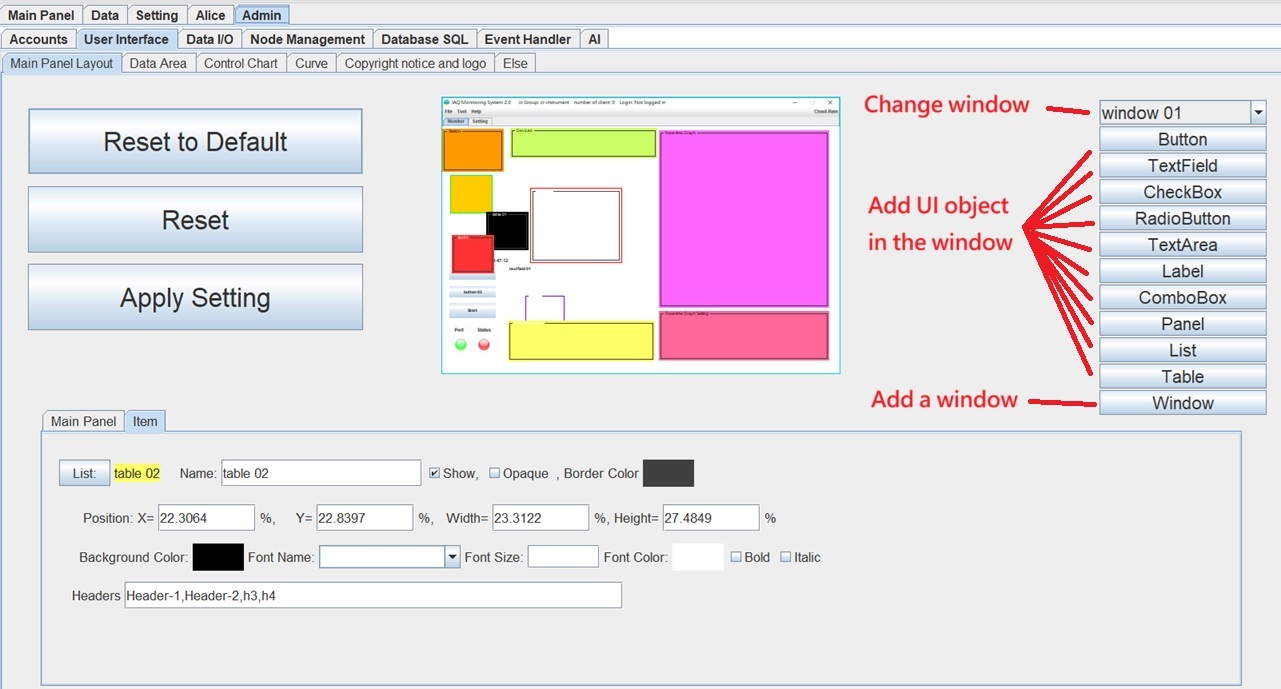 2. 使用鍵盤調整物件時: (1).移動: 上/下/左/右 鍵。 (2).快速移動: CTRL + 上/下/左/右 鍵。 (3).改變大小: Shift + 上/下/左/右 鍵。 3. 在主要面版設計, 符號 '%' 表示是相對於螢幕大小的百分比。 在其他項目設計, 符號 '%' 表示是相對於主要面版大小的百分比。 4."Start button" 和 "Stop button" 是同一個按鈕, 只是狀態不同. 當按下 "Start button"之後, 即進入時監控狀態, 當按下 "Stop button"之後, 即離開即時監控狀態。 |
.警
示機制| E-mail警示 1.發送email的帳號須是gmail帳號, 因此須先申請gmail帳號當email的送出方。(接收方則無此限制) 2.須設定發送email的電腦的安全性 (設定為低安全性), 方法為在該電腦上登入email帳號並進行設定。(細節請google 查詢"gmail low security application" ) 3.若仍有問題, 選擇使用 "使用應用程式密碼登入" , 由google email 系統產生應用程式密碼 (16碼密碼, 此密碼只能用於發送email, 但不能用於登入 gmail) 簡訊(SMS)警示1.須向簡訊服務廠商(例如簡訊王)申請發送簡訊的帳號, 2.此簡訊服務廠商的簡訊發送方式須能以網址格式發送簡訊, 例如 http://202.49.148.216/kotsmsapi-1.php?username=john&password=pw1234&dstaddr=0911876353&smbody=You_are_wonderful 3.在簡訊設定處, 設定發送方式, 例如: http://202.49.148.216/kotsmsapi-1.php?username=[#account#]&password=[#password#]&dstaddr=[#sendToPhone#]&smbody=[#message#] 聲音警示1.可接受的聲音檔案格式為 *.mp3, *.wav及*.au等。 2.聲音響起後, 若要停止聲音, 請按 'ESC' 鍵。 |
.事
件處理設定新增一個事件處理的步驟, 如下圖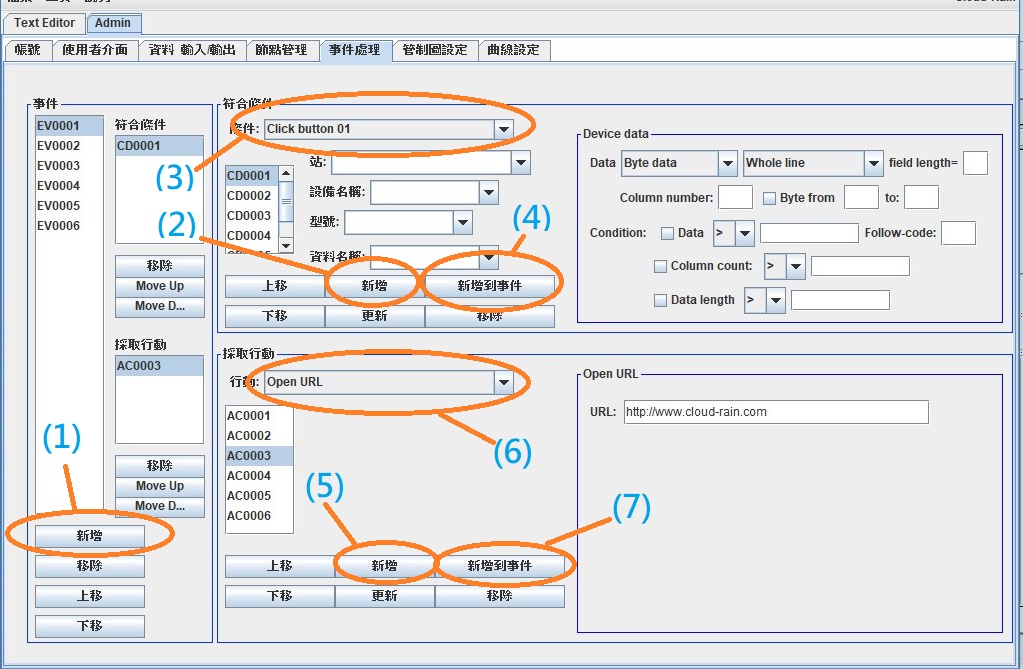 各步驟說明如下: (1) 新增一個事件, 此時事件列表會新增一個事件代號, 例如 EV006。 (2) 新增一個條件, 此時條件列表會新增一個條件代號, 例如 CD005。 (3) 選擇條件項目, 如果如該條件有參數的話, 並輸入該條件所需參數值。 (4) 將此條件新增到事件,作為觸發事件的條件。 (5) 新增一個行動 (即符合上述條件時要採取的行動), 此時行動列表會新增一個行動代號, 例如 AC007。 (6) 選擇行動項目, 如果如該行動有參數的話, 並輸入該行動所需參數值。 (7) 將此行動新增到事件, 作為觸發事件時要執行的行動。 Conditions:
(此又可以分為兩類,一種是觸發性的condition,另一種是非觸發性的condittion)觸發性的condition, 例如: After connected After disconnected After system startup AI processing result data Any data Before system terminated Checkbox 01 action Window 02.heckbox 01 action Click button 01 Click button 02 Click window 02.button 02 Click connect button Click start button Click stop button Click file menuitem 01 Click help menuitem 01 Click tool menuitem 01 Combobox 01action Window 02.combobox 01action Data checked by Java class Database data Device data File data (binary) File data (text) List 01 action Window 02.list 01 action Message 01 confirmed YES Message 01 confirmed NO Object data Over upper alert level Over upper take-action level Radiobutton 01 action Window 02.radiobutton 01 action Schedule time Textfield 01 action Window 02.textfield 01 action Under lower alert level Under lower take-action level 非觸發性的condittion: (單獨存在將無作用,必須伴隨觸發性的condition才有作用) and in continuous monitoring mode and checkbox 01 checked and checkbox 01 not checked and radiobutton 01 selected and radiobutton 01 not selected and window 02.checkbox 01 checked and window 02.checkbox 01 not checked and window 02.radiobutton 01 selected and window 02.radiobutton 01 not selected Actions: (符合前面設定的condition之後,即會執行設定的action)Action sound alarm Alert sound alarm AI learning AI processing AI add processing result to learning data AI add data to learning data All station send command Append data to textarea 01 Append data to window 02.textarea 01 Combobox 01 add item Combobox 01 set items Combobox 01 remove item Combobox 01 remove all items Window 02.combobox 01 add item Window 02.combobox 01 set items Window 02.combobox 01 remove item Window 02.combobox 01 remove all items Connect all port Database query Database update Disable button 01 Disable window 02.button 01 Disconnect all port Enable button 01 Enable window 02.button 01 Exit application First device send command First station send command FTP delete FTP download FTP upload Java class (see Java developer guide for more detail) Java class of dce node (see Java dce developer guide for more detail) List 01 add item List 01 set items List 01 remove item List 01 remove all items Window 02.list 01 add item Window 02.list 01 set items Window 02.list 01 remove item Window 02.list 01 remove all items Log Next device send command Next station send command Open URL Operating system command Pause Play sound Read file line by line Read binary file Read text file Restart application Run apache ant Run apache maven Save to file Set A=B Set A=Euler's number Set A=pi Set A=random() Set A=log(B) Set A=log10(B) Set A=B! Set A=sin(B) Set A=cos(B) Set A=tan(B) Set A=cot(B) Set A=sec(B) Set A=csc(B) Set A=exp(B) Set A=abs(B) Set A=cbrt(B) Set A=random(B,C) Set A=round(B) Set A=signum(B) Set A=sqrt(B) Set A=toradians((B) Set A=todegrees(B) Set A=B+C Set A=B-C Set A=B*C Set A=B/C Set A=(the logarithm base B) C Set A=ave(B,C) Set A=mod(B,C) Set A=max(B,C) Set A=min(B,C) Set A=pow(B,C) Set A=(B=C) Set A=(B>C) Set A=(B<C) Set A=(B>=C) Set A=(B<=C) Set A=f(x) (see Mathmatical expression in cr-Instrument for more deatil.) Set A=f(x,y) (see Mathmatical expression in cr-Instrument for more deatil.) Set action data Set data value Set device SN Set device value Send command Send email message Send SMS message to mobile phone Set label 01 value Set winsow 02.label 01 value Set text value Set textarea 01 value Set wondow 02.textarea 01 value Set textfield 01 value Set wondow 02.textfield 01 value Set textlabel 01 value Set window 02.textlabel 01 value Set variable value Show message dialog Show confirm message dialog Start monitor Stop continue send command Stop monitor Stop reading file Table 01 add row data Window 02.able 01 add row data Update event setting from file 轉
換參數 (主要用於1.set text field 2.set text label 3.db sql script 4.send sms
msg 5.send email (subject and msg) 6.log as action 7.show
option
pane as action 8.java class as action (used this for parameter) 9.OS
command 10.save to file as action 11.send command as action等)[#20#] = " " (=space) [#space#] = " " [#2c#] = "," [#rn#] = "\r\n" [#0d0a#] = "\r\n" [#n#] = "\n" [#r#] = "\r" [#0d#] = "\r" [#0a#] = "\n" [#id#] = my ID [#ip#] = my IP [#cr_engine_version#] = cr_engine version [#cr_wsn_version#] = cr_wsn version [#computername#] = computer name [#computeros#] = computer OS [#computerarch#] = computer architecture [#groupname#] = group name [#nickname#] = my nick name [#jvmversion#] = jvm version [#jvmarch#] = jvm architecture [#ap_version#] = application version [#country#] = country [#language#] = language [#starttime#] = system start time, in "yyyy-MM-dd HH:mm:ss" format [#datavalue#] = data value [#textvalue#] = text value [#originaltime#] = data time in ms [#originaldata#] = original data value [#date#] = date, in "yyyy-MM-dd" format [#datetime#] = date and time, in "yyyy-MM-dd HH:mm:ss" format [#time#] = time, in "HH:mm:ss" format [#ci_version#] = cr-instrument.version [#title#] = title with version [#$variable_name#] = value of a variable, ex:[#$testvalue#] [#textfield01#] = textfield01 value [#window 02.textfield 04#] = window02.textfield04 value [#textarea01#] = textarea01 value [#window 02.textarea 04#] = window02.textarea4 value [#label01#] = label01 text value [#window 02.label03#] = window02.label03 selected value [#combobox01#] = combobox01 selected value [#window 02.combobox03#] = window02.combobox03 selected value [#list01#] = list01 selected value [#window 02.list03#] = window02.list03 selected value [#table01.col01.row02#] = table01.col01.row02 value [#window 02.table01.col01.row03#] = window 02.table01.col01.row03 value [#table01.row02#] = table01.row02 value, in csv format [#window 02.table01.row03#] = window 02.table01.row03 value, in csv format Button
01, 是指監控畫面右上角的按鈕, 如下圖。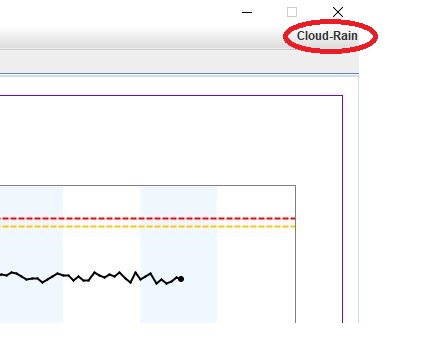 |
.分
散式網路架構| 當
需要進行遠方監控, 或當需要同時監控多部設備時, 可採用分散式網路架構。 點對點連線 1.以IP連接IP的方式進行點對點連線, 如下圖示。 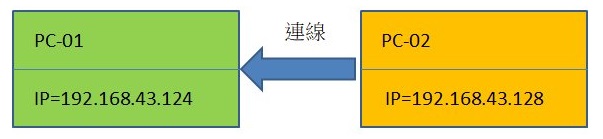 連線設定的畫面 連線設定的畫面1.連線的設定晝面會在程式啟動後出現。 2.勾選 "連結到IP", 並輸入對方IP值, 即可進行連線, 如下圖。 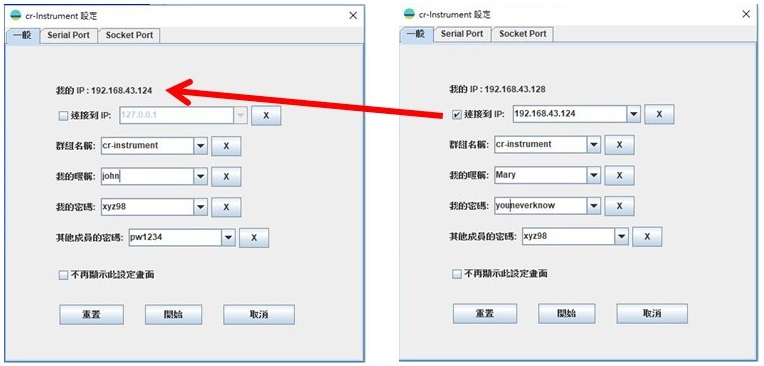 安全機制 安全機制1.各節點(Node)之間, 必須取得對方授權, 才能進行各項管制動作(例如開啟及關閉socket port及serial port)。 2.各 節點(Node)之間的安全機制如下圖所示。當對方傳過來的 commandcode符合我的commandpw時, 便可取得我的授權。  有 關密碼的設定畫面如下圖: 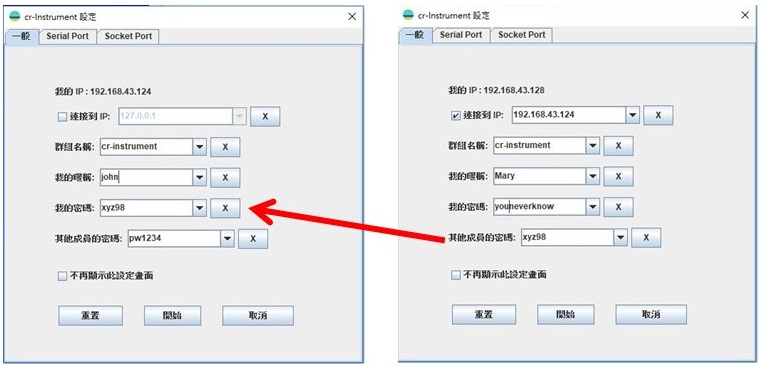 多點連接 多點連接1.多點連接時, 需遵守一個原則: 只有其中一個節點是根節點 (Root Node), 以下各圖例的綠色節點即是根節點。 2.連接點的數量並沒有限制, 只是當點數太多而且傳輸大量的數據時, 可能會影響傳輸速率。 以下為多點連接之例 1。 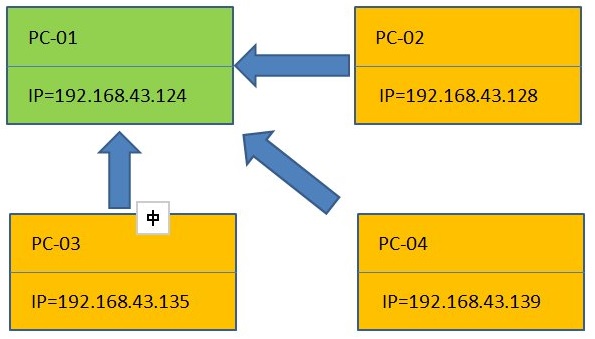 以下為多點連接之例 2。 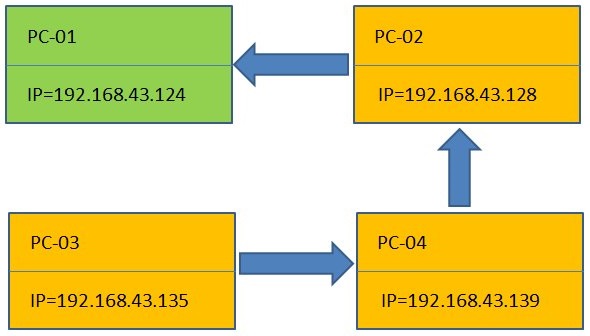 以下為多點連接之例3。 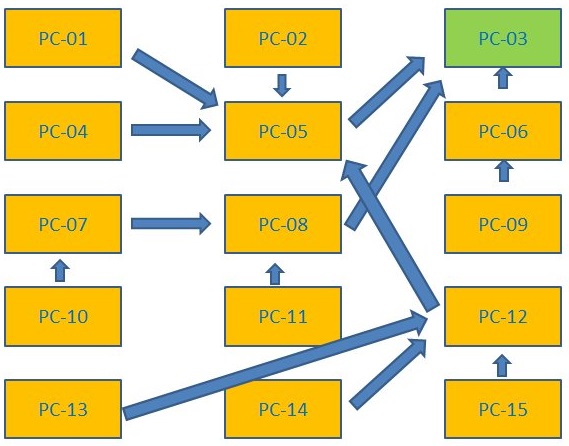 |
.名
詞解釋| 事件處理設定裡的"Byte data",
"String data", 及 "Byte String data": 當從一設備收到一 組Byte data, 例如, 若收到的byte data是 {0x31,0x32,0x33}, 則 string data 是 "123" (以ASCII 值表示的字 串), 而 byte string data 則是 "313233". (以十六進位值為字串, 中間不含空白) |